
Running a convenience store looks simple on the surface. In reality, it involves constant coordination, tight margins, and strict operational discipline. Therefore, even small inefficiencies can quickly reduce profitability.
Checklist software has become a critical tool for modern convenience store operators. It helps standardize daily tasks, reduce errors, and improve accountability across teams. In addition, it provides real-time visibility into store performance.
This guide explains exactly how to boost convenience store ops with checklist software. It includes step-by-step implementation, real data, and proven tools used across the industry.
Why Convenience Store Operations Are Hard to Scale
Convenience stores operate in fast-paced environments. Staff turnover is high, and workflows must be consistent every day. Therefore, maintaining standards across shifts is challenging.
According to the National Association of Convenience Stores (NACS), there are over 150,000 convenience stores in the United States alone.
Source: https://www.nacs.org/research/convenience-store-count
In addition, the global convenience store market continues to grow steadily.
Statista reports global revenue exceeding $3 trillion.
Source: https://www.statista.com/topics/1898/convenience-stores
However, operational inefficiencies remain a major issue. For example, poor execution of daily tasks leads to stock loss, compliance risks, and poor customer experience.
What Is Checklist Software?
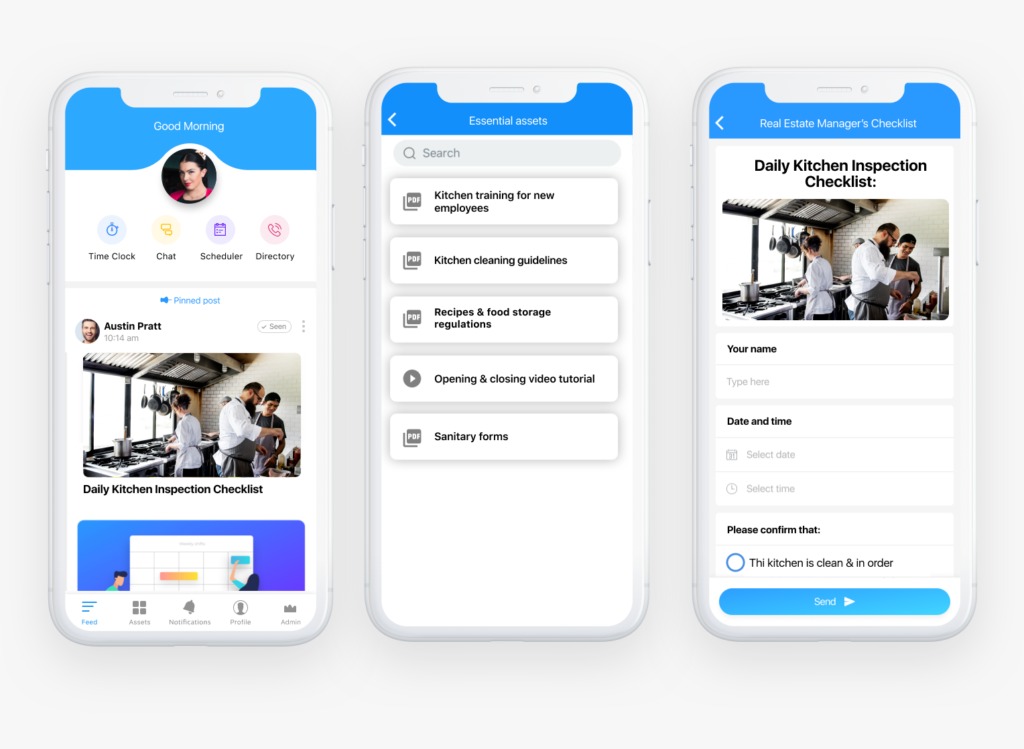
Checklist software replaces paper checklists with digital systems. These systems allow staff to complete tasks using mobile devices or tablets.
Each checklist is structured, trackable, and time-stamped. Therefore, managers can verify that tasks are completed correctly.
Typical features include:
- Task scheduling
- Real-time tracking
- Photo verification
- Automated reminders
- Reporting dashboards
In addition, checklist software integrates with other operational systems.
Why Checklist Software Matters for Convenience Stores
1. Operational Consistency
Consistency is critical in retail. Therefore, every shift must follow the same procedures.
Checklist software ensures tasks are completed the same way every time.
2. Reduced Shrinkage
Shrinkage is a major issue in convenience stores. It includes theft, errors, and spoilage.
According to the National Retail Federation, shrink accounted for 1.6% of retail sales in 2022.
Source: https://nrf.com/research
Therefore, better process control directly impacts profitability.
3. Improved Compliance
Convenience stores must meet health, safety, and labor regulations.
Checklist software ensures compliance tasks are completed and documented.
4. Better Staff Accountability
Every task is assigned and tracked. Therefore, employees are more accountable.
5. Faster Decision Making
Managers can access real-time data. In addition, they can identify issues quickly.
Step-by-Step: Boost Convenience Store Ops with Checklist Software
Step 1: Map Out Daily Operations
Start by documenting all recurring tasks. These include:
- Opening procedures
- Closing procedures
- Cash handling
- Inventory checks
- Cleaning schedules
- Food safety checks
For example, a typical morning checklist may include checking refrigeration temperatures.
In addition, include weekly and monthly tasks.
Step 2: Identify Operational Gaps
Review your current processes. Look for areas where tasks are missed or inconsistent.
For example:
- Missed cleaning tasks
- Inaccurate stock counts
- Delayed restocking
Therefore, you can prioritize improvements.
Step 3: Design Standardized Checklists
Create structured checklists for each process. Keep them simple and clear.
Each checklist should include:
- Task description
- Responsible role
- Deadline
- Verification method
For example, a food safety checklist may require a photo of temperature readings.
In addition, avoid overly complex checklists. Simplicity improves completion rates.
Step 4: Choose the Right Checklist Software
Selecting the right tool is critical for success.
MENA-Based Solutions
International Solutions
- safetyculture.com (iAuditor)
- zenput.com
- process.st
SafetyCulture reports that digital checklists can reduce inspection time by up to 50%.
Therefore, the right platform can significantly improve efficiency.
Step 5: Digitize Your Processes
Convert all paper-based checklists into digital formats.
This includes:
- Cleaning logs
- Temperature logs
- Cash reconciliation forms
- Inventory counts
For example, staff can log data using mobile devices instead of paper.
In addition, digital records are easier to store and access.
Step 6: Train Your Staff
Training is essential for adoption. Therefore, ensure all staff understand how to use the system.
Focus on:
- Completing checklists
- Uploading photos
- Reporting issues
According to McKinsey, effective training programs can increase productivity by up to 25%.
Source: mckinsey.com
Step 7: Implement Real-Time Monitoring
Use dashboards to track performance across stores.
Managers can monitor:
- Task completion rates
- Missed tasks
- Compliance issues
Therefore, problems are identified immediately.
Step 8: Automate Alerts and Reminders
Set up notifications for critical tasks.
For example:
- Alerts for missed checklists
- Reminders for inventory checks
- Notifications for compliance issues
In addition, escalation rules ensure urgent issues are addressed quickly.
Step 9: Analyze Performance Data
Checklist software generates valuable data.
Track key metrics such as:
- Task completion rates
- Audit scores
- Issue frequency
According to Deloitte, data-driven businesses outperform competitors significantly.
Step 10: Continuously Improve Processes
Review your checklists regularly.
Update them based on:
- Operational changes
- Compliance updates
- Staff feedback
Therefore, your system stays relevant and effective.
Real-World Use Cases
Example 1: Reducing Food Waste
A convenience store chain implemented digital temperature checks.
Result:
- 20% reduction in food spoilage
- Improved compliance with safety standards
Example 2: Improving Staff Accountability
A multi-location operator introduced checklist software.
Result:
- 35% increase in task completion rates
- Faster issue resolution
Example 3: Streamlining Audits
Stores replaced manual audits with digital checklists.
Result:
- 50% reduction in audit time
- Better reporting accuracy
Key Challenges and Solutions
Staff Resistance
Employees may resist new systems. Therefore, involve them early and provide training.
Overcomplicated Checklists
Complex checklists reduce compliance. Keep them simple and focused.
Lack of Follow-Up
Data is useless without action. Therefore, assign responsibility for reviewing reports.
MENA Market Trends in Retail Technology
The MENA region is rapidly adopting digital tools.
For example, Saudi Arabia’s Vision 2030 promotes digital transformation.
In addition, the UAE is investing heavily in retail technology innovation.
Therefore, convenience store operators must modernize operations to stay competitive.
Best Practices for Success
Keep Checklists Short
Short checklists are easier to complete.
Use Mobile-First Tools
Staff need tools they can use on the floor.
Focus on Critical Tasks
Prioritize tasks that impact revenue and compliance.
Review Data Regularly
Use data to improve operations.
The Future of Checklist Software
Checklist software is evolving rapidly.
AI Integration
AI can identify patterns and predict issues.
IoT Integration
Sensors can automate data collection.
Advanced Analytics
Businesses can make smarter decisions using data.
According to Gartner, 75% of organizations will use advanced analytics by 2026.
Source: gartner.com
Final Thoughts
Checklist software is no longer optional for convenience stores. It is a core operational tool.
It improves efficiency, reduces errors, and enhances compliance. In addition, it provides real-time visibility.
Businesses that adopt checklist software gain a competitive advantage. Therefore, investing in the right system is critical.
Simplify Store Operations and Scale with Confidence
Managing staff across multiple locations can be challenging, but software solutions like Modeeri make it seamless. Designed by experienced operators, Modeeri is the ultimate tool to streamline operations and ensure consistency across your entire chain.
With robust features such as checklist management, temperature monitoring, organized document storage, automated training programs, and label management, Modeeri empowers your team to maintain top performance, even when you’re not onsite.
Tailored for multi-location businesses with deskless teams, Modeeri simplifies onboarding, enhances compliance, and ensures every location operates to your high standards. Learn more or try Modeeri for free today!
Image by freepik